
Upgrade Windows Vista to Windows 7
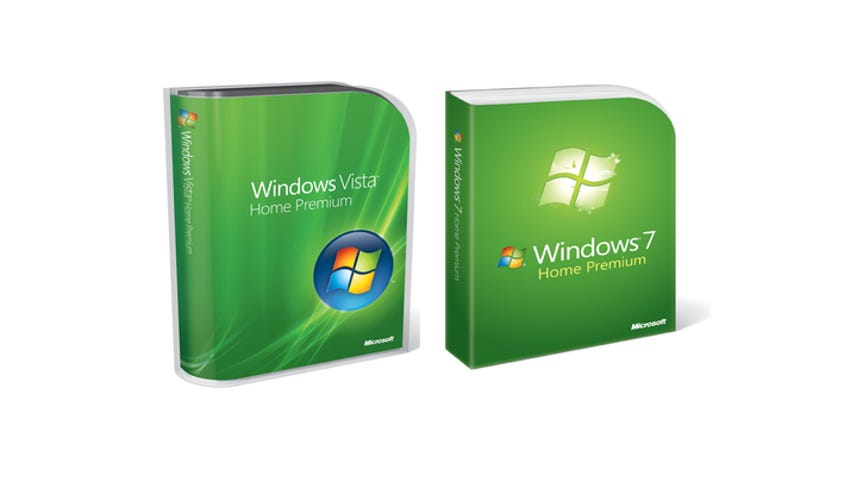
If you're upgrading from Windows Vista to Windows 7 it should be a fairly easy install. You can do what's called an in-place upgrade as long you install the same version of Windows 7 as you have of Vista.
For instance, if you have Windows Vista Home premium you can upgrade to Windows 7 Home Premium. You can also go from Vista Business to Windows 7 Professional, and from Vista Ultimate to 7 Ultimate. Any other upgrade, like Vista Home Premium to Windows 7 Professional, will require a clean install. That means you can't just turn Vista into 7. You have to export all your data, erase the hard drive, and then reinstall all your applications and data. A lot of computer experts think you should do a clean install anyway, just to make sure your machine runs better.
See our video for upgrading XP to Windows 7 for that process.
But if you're lucky enough to be able to do an in-place upgrade and want to, here's what you do.
First back up your data. Just to be safe, I recommend Macrium Reflect as a great way to image your drive.
Next, put in the install DVD and select Run setup.exe.
Press continue.
If you're unsure whether Windows 7 will run, press Check compatibility online. Though really you should check that before you buy Windows 7. It will take you to a Web page where you can download and run the Windows 7 upgrade adviser. But if you're sure you're compatible, go ahead and click Install now.
Windows 7 will begin copying temporary files and start the install. It will first ask you if you want to go online to get the latest updates. I recommend you do it; it could save you some time later. Then agree to the terms that you have fully read and understand.
Select Upgrade. Windows will check compatibility and then begin copying files. After awhile, probably hours not minutes, you're machine will start back up into Windows 7!
Now you may have some settings that didn't transfer and are overwritten by Windows 7 defaults. Most notorious are the programs in your taskbar. So, be ready to do some tweaking to get things just exactly the way you like them. Also since you didn't start fresh some quirks in Vista may carry over to 7. But most won't.
Overall, it's a much simpler and faster process than the clean install.


Would you like a wrap-up of the week's hottest CNET TV videos delivered directly to your in-box? Then sign up for the weekly CNET TV newsletter, delivered every Friday.
By the way, you can get the family pack (upgrade 3 PCs) for something like $149. I saw it earlier on
http://www.uberi.com
Personally, I have been running Windows 7 RC for a few months and must say this is the most awesome OS I have used. It's pretty, it runs fast, and is compatible with everything I throw at it. Overall, it's just extremely speedy and user friendly.
I used to run on Vista Home premium but now I'm on Win 7 Ultimate edition.
And all I did was to use the built in 'Upgrade' feature.
The Upgrade might have failed had I upgraded to a 64bit version of Win 7 Ultimate as I previously had a 32bit Vista premium.
in my country in lebanon we buy the windows dvd for 2 $ :))))
"Users with Vista home premium can in-place install 7 home premium." You should clarify that this only holds if you're going from 32-bit to 32-bit. I'm going from 32 to 64, and probably won't be able to upgrade in-place, correct?
Also, students qualify for $30 pricing, for any students out there. I bought 3 copies for our 3 computers for $90.
Wouldn't be a problem, except I'm dual-booting to XP (on another drive) for work, and can't find any info on whether or not the reformat/install will wreck the dual-boot.
It's just laying software down on top of a previous OS, if there's feature in Vista Ult that's not supported in 7, it should just IGNORE it and let you know in the advisor. Not to upgrade is ludicrous.
Nice MS, very nice....
The thing is; I bought a pc not long ago, with Vista. Someone then said something about that when Windows 7 is released, I could just go online and get it for free. How do I do that?
Please help, I want Windows 7 soon :D
How much different between the clean install and the upgrade, actually? What is the main advantage doing so?
could someone give me a clear description? thanks a lot.
hope it helps
1..if i use win 7 as a 32bit os can i use 4 sticks of memory "instead of staying at 3 as of now?
2.Will the install tell me what i need to remove from" mutilple Hard Drives or do i do a totally clean install i have music and pictures on 2 different drives and all games on another plus the regular OS drive ,4 drives 3 are internal and one external?
Thank's in advance for any help
-
by tadtam
November 26, 2009 7:47 AM PST
- I installed Win7 Home upgrade to Vista. Went smoothly, but Win7 has no email program. Therefore, I could not accesss my Winmail account/program since Win7 eliminates it.
-
Like this
Reply to this comment
-
(27 Comments)Took me 2 days to solve problem----
Had to DL&Install Windows Live Essentials. Then I was able to access all my Winmail saved emails, contacts etc.
MS should have told you in their fancy booklet that comes with upgrade......Shame on you MS