May 23, 2008 1:52 PM PDT

Move iTunes to a new computer

by Tom Merritt
  • Font size
  • Print
  • 8 comments
Share
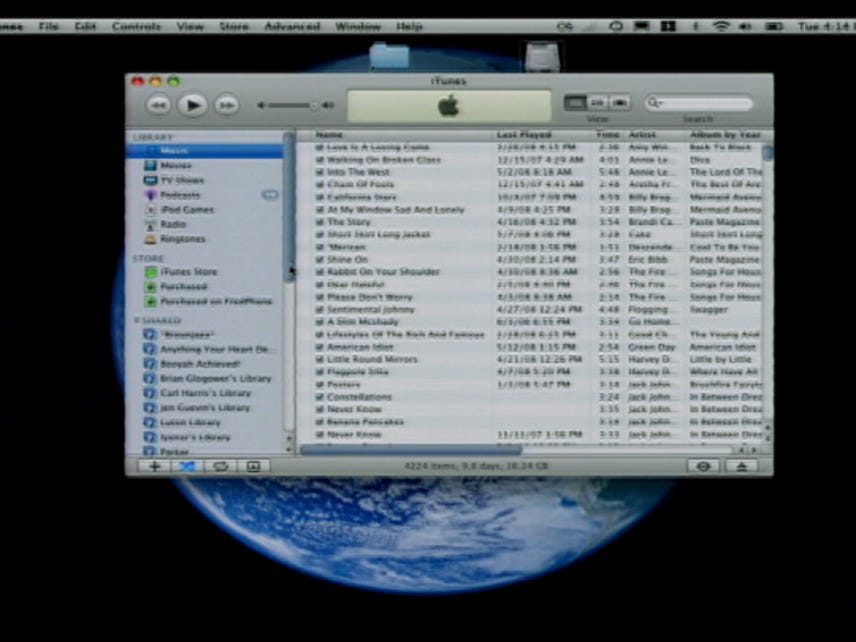
You've spent years carefully crafting playlists and ratings in iTunes. How can you move all that stuff and your music to a new computer? Read this tip and watch the video to see the steps in action.

For this example, I'll go from a Windows machine to a Mac, but the process should work in reverse, as well.

If you want to make this easy, you'll need to move all your music into the iTunes folder. There's an easy way to do this: In iTunes go the Advanced menu and choose Consolidate library.

Sit back and chill while your music is copied. And I do mean copied. Any music not already in the iTunes folder will not be deleted. You'll just have two copies. One inside the iTunes folder and one outside.

Now quit iTunes and go to My Documents, then My Music, and you should see the iTunes folder. Now you need a place to put that folder. It could be an external drive, a network drive, or if you have a big enough iPod, use that. Whatever you use just needs to be big enough to hold all your data. Right click on the folder and choose Properties to find out how big it is.

Drag the iTunes folder and copy it to wherever you're temporarily storing it.

Go have lunch.

Then connect the storage device to the new computer. In this case a Mac.

  1. Install and launch iTunes. If iTunes asks to find your music say "no."
  2. Quit iTunes.
  3. Go to your Music folder.
  4. Move the existing iTunes folder to the trash.
  5. Copy the old iTunes folder off your storage device and put it where the old folder was.
  6. Open iTunes again.
You should see your familiar library with ratings, play counts, etc.
Recent posts from CNET TV
Top 5 worst holiday tech gifts
CNET Top 5 Sony Reader Touch edition giveaway - official rules
Real Deal Podcast 190: Online TV and movies
Forward Yahoo Mail to Gmail for free
Top 5 video game characters
Batteryless MacBook sleep trick
Surf the Net like it's 1991 with Gopher
Holiday Help Desk show notes: November 30
Add a Comment (Log in or register) (8 Comments)
  • prev
  • 1
  • next
by tnallamshetty May 27, 2008 5:33 AM PDT
Thanks Tom, for your excellent post on how to transfer itunes to a new comp. I recently bought a macbook pro and I was beating my head figuring out a easy way to transfer my itunes. You rock! Take care.
-Trivi.
Reply to this comment
by sdhar23 May 27, 2008 2:30 PM PDT
Wait couldn't you just plug in your ipod to your new computer and sync it?
Reply to this comment
by catxpa May 27, 2008 3:26 PM PDT
Interesting method but I find it easier simply to use the Backup feature in itunes. Once your library is backed up onto dvds/cds, just install itunes on the new computer, put your disc(s) in the drive and click restore library. I have changed computers twice and have not lost any music or videos using this method.
Reply to this comment
by whatnow992 May 27, 2008 5:16 PM PDT
no, you need a special program to copy the music FROM the iPod back to your computer.
Reply to this comment
by Slotmech May 28, 2008 3:24 PM PDT
Tom probably should have noted that if you're going to copy the folder to your iPod, you need to copy it to the DATA partition (if you have your iPod set up that way; I don't think most people do); your iPod doesn't care what's in that.
Reply to this comment
by RaymondmODonnell July 23, 2008 2:59 PM PDT
Tom; I have tried exactly what you said and it just doesn't work. Nothing appears in my Itunes. I consolidated a 8.6 gb library to a usb drive. Then deleted my existing and added the new 8.6 gb library. I even tried replacing the iTunes library.itl and iTunes Music Library.XML files. No difference. What am I doing wrong Ray
Reply to this comment
by RaymondmODonnell July 23, 2008 7:14 PM PDT
OK - Im sorry. I don't know what was wrong but after I copied it again it works fine. Im sure it was my error just don't know why. Thanks for the great tip!!! Ray
Reply to this comment
by computer-bits October 28, 2009 8:14 AM PDT
I've been using the above system for moving i-tunes to new computers for years, I have my whole collection of music on an external HDD.
I have just bought a 500GB SATA for my Laptop and now want my i-tunes collection on the laptop, but the only problem is that i want to keep all my play counts, ratings ect but if i put the collection onto the laptop will i have to manualy asign the tracks (there are 1000's) to the new 'c' drive???? Currently all my i-tunes music is on HDD with the letter 'M' ..????
I do not want a seperate partition for music on the new HDD.

Any ideas how to get over this
Reply to this comment
(8 Comments)
  • prev
  • 1
  • next
advertisement
Click Here

About CNET TV

CNET TV is where you get your video fix on the coolest gadgets, the latest gear, and up-to-the-minute tech reviews and news. And the CNET TV blog provides you a behind-the-scenes look at our shows, personalities, and even upcoming site features.

Add this feed to your online news reader

CNET TV Twitter Feeds

CNET TV topics

CNET TV bloggers

Brian Cooley
Molly Wood
Tom Merritt
Justin Eckhouse
Brian Tong

Get the CNET TV newsletter

Would you like a wrap-up of the week's hottest CNET TV videos delivered directly to your in-box? Then sign up for the weekly CNET TV newsletter, delivered every Friday.
Subscribe now!